Under Construction
 |
 |
 |
02.05 - MIDI Wiring
This chapter requires some basic knowledge about MIDI and presumes, you aren't going to wire up your computer and your electronic
instruments for the first time.
The 5-pin MIDI cables always connect the MIDI OUT jack of one instrument or computer with the MIDI IN jack of another and vice versa.
MAKE SURE ALL OF YOUR GEAR IS SWITCHED OFF WHILE WIRING UP YOUR MIDI NETWORK !!!
Ideal MIDI Wiring
In ideal circumstances you are a proud owner of a Steinberg MIDEX or any other MIDI port expansion supported by MROS and a master keyboard (this could be a synth with a built-in keyboard) in addition to an Atari ST computer and your Akai sampler. The master keyboard is preferably equipped with at least one controller knob sending MIDI Control Change Messages as you turn the knob.
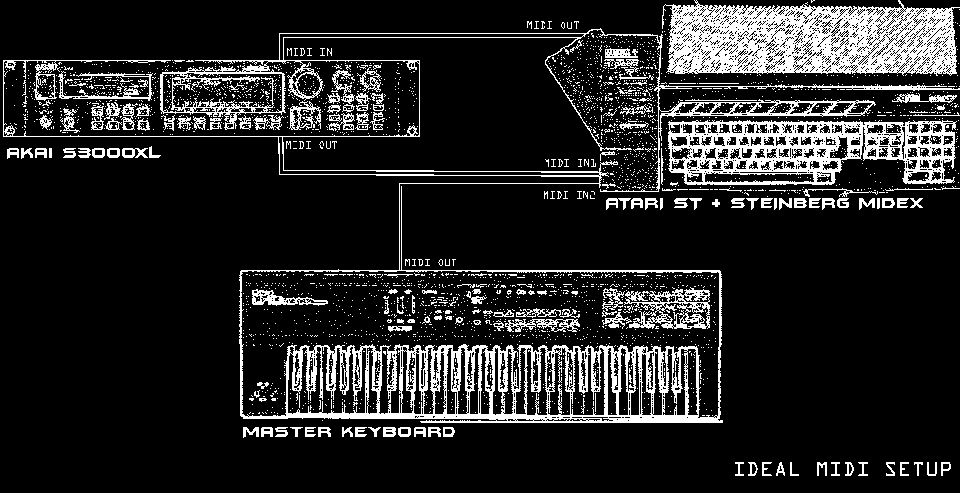
While your gear is switched off, gently push the MIDEX expansion into your ROM port on the left of the Atari, no matter which model of the ST line of computers you actually have. This is extending the amount of MIDI OUT jacks from 1 to 5 with the first MIDI OUT jack being the internal jack of the Atari itself. Furthermore the amount of MIDI IN jacks is extended by 2 to 3 jacks.
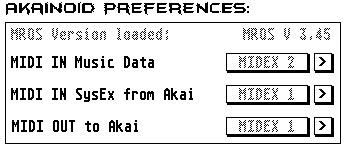
These jacks are adressed as
- "ATARI" for the internal MIDI OUT and IN of the Atari and
- "MIDEX 1" to "MIDEX 4" for the new MIDI OUTs supplied by the MIDEX
- "MIDEX 1" and "MIDEX 2" for the new MIDI INs supplied by the MIDEX
in the Preferences dialogue of AKAINOID. Please note, that other MIDI interfaces / expansions will come with names for their MIDI ports different from those in above list.
Assumed you have wired up your MIDI devices like the example in the picture above suggests:
- a 5pin MIDI cable from MIDEX OUT1 to MIDI IN of the Akai
- a 5pin MIDI cable from Akai MIDI OUT to MIDEX IN1
- a 5pin MIDI cable from Master keyboard MIDI OUT to MIDEX IN2
then MIDI ports in the Preferences dialogue should look like in the following screenshot:
Minimal Setup
You can still operate AKAINOID if you currently don't have access to a MIDI keyboard. You don't necessarily need a MIDI port expansion like the MIDEX either. In this case wire your Atari ST (hardware or emulated) to your Akai sampler like in the following picture:
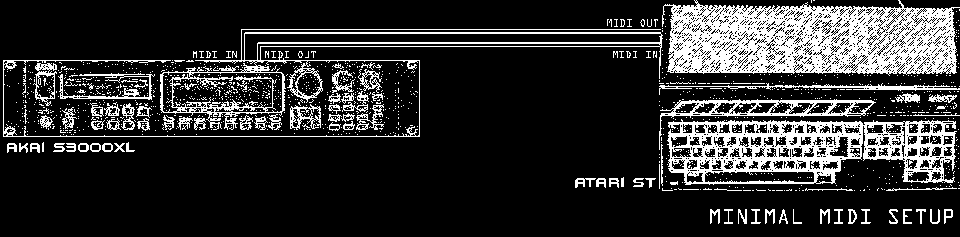
All three MIDI ports in the Preferences dialogue should then be set to "ATARI".
You can still audition your work by clicking the MIDI THRU LED in the ToolBox of AKAINOID
or by clicking keys on the on-screen keyboard of the Key Editor in PROGRAM Mode.
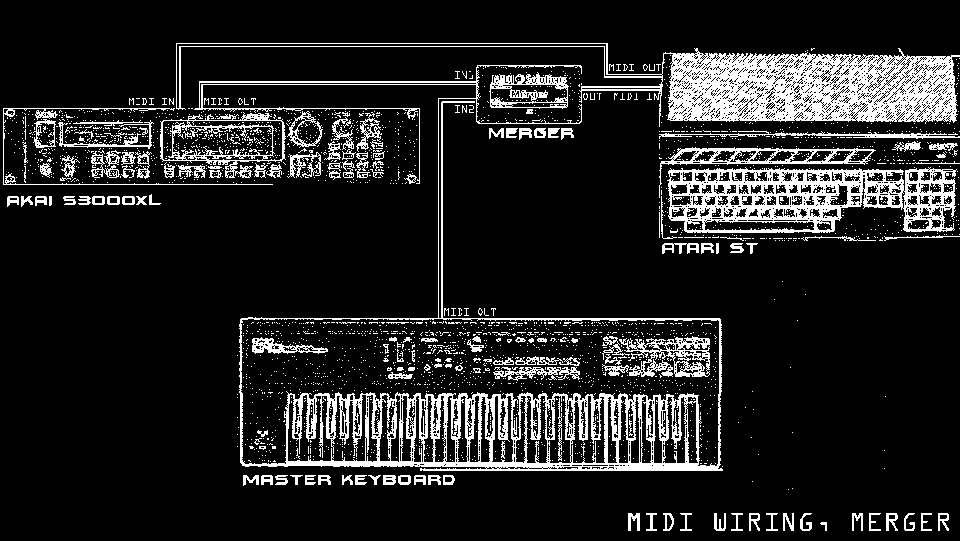
MIDI Merger
A MIDI Merger like this one by MIDI Solutions is a small box uniting 2 or more incoming MIDI signals to one outgoing MIDI data stream, which often is duplicated to a second MIDI OUT of the Merger.
Power Setup
|
|
|