Under Construction
 |
 |
 |
04.01 - The Preferences Dialogue
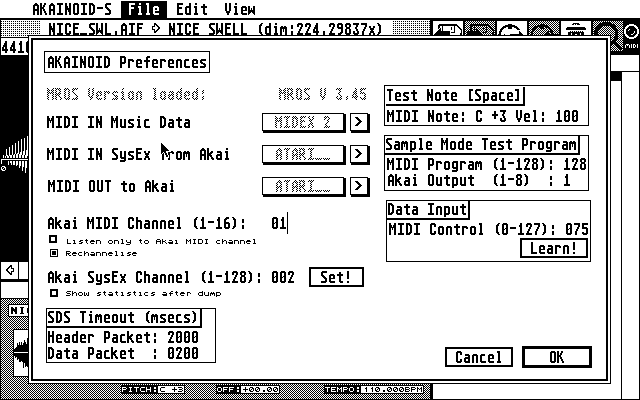
You now need to choose Edit Preferences from the pull-down menu in the File
section and provide information about how you have set up and connected your
Akai sampler.
There are 2 ports to set up for MIDI IN: One for receiving the Akai SysEx data and a second one for incoming music data sent by a connected MIDI keyboard or a second computer/Atari running a sequencer program. If you have a MIDI Merger's OUT connected to one of your Atari's MIDI INs, these two ports can actually be the same. The MIDI OUT port should be the one connected to your Akai.
Step through your available MIDI ports by clicking the [ > ]-buttons behind
the port names. The amount of available ports varies depending on your
connected extra hardware supported by MROS (like a MIDEX+) considered you
have copied the corresponding MROS driver to your AUTO folder as explained
above.
NOTE:
There are always MROS ports available. Choose these MROS ports at your
own risk. They are virtual MIDI ports between multi-tasking Steinberg
applications such as Cubase and Synthworks. I know little about MROS
multi-tasking, so I can't tell what will happen, if you choose an MROS port.
Allthough it is highly unlikely, but if a chosen MROS MIDI port should work
out for you, please tell me about it in an email!
Enter the MIDI and SysEx channel as you chose them on your Akai sampler.
NOTE:
A feature I had forgotten to implement for a long time is to set the
SysEx channel on the Akai to what you have entered in this very dialog. This
is what the [Set!]-button is for. When you have saved the preferences, this
SysEx channel is set on the Akai everytime you start SINGLE or PROGRAM mode.
You can choose whether AKAINOID shall listen to only the MIDI channel
specified or if MIDI data coming in on the Music port should be
rechannelised to the MIDI channel of the Akai program selected (which is
important in PROGRAM Mode).
The nature of your MIDI network (especially when MIDI Merges are in between the Atari and the Akai) and running AKAINOID in an Atari emulator can significally slow down sample dumps, so the time it takes until the Atari receives an Akai confirmation of a received dump package via MIDI can exceed certain time limits (timeouts). You can increase these Timeouts in milliseconds if your sample dumps fail too often.
If you don't care for the sample dump statistics after a sample transfer,
you can deselect this feature.
A customised test program called AKAINOID is generated on the Akai during initialisation of
Sample Mode. It can be set up, so you can play back the
sample in Sample Mode on one of the Akai's individual outs. This Akai
program will be removed again from the Akai as soon as you leave SAMPLE
Mode.
Furthermore I plan a MIDI controller knob on your master keyboartd to be set
up for data entry - at least for suitable parameters of the sampler. You may however already set up the MIDI controller number by entering or learning.
When you started the learning process clicking the button, move your controller knob as fast as you can. A split second after leaving the knob alone,
your controller number should be filled into the Preferences dialog.
The File Block Size is significant for the speed of loading and saving huge binary files such as .WAV or .AIF files and can be increased, especially if you own a modern hard disk replacement for the Atari such as Lotharek's "Ultrasatan" SD card drive. I own an Ultrasatan and concluded that the value 1536 Bytes is quite perfect.
The Right Locator thingy and FIND setting will be explained in the chapter about Finding Loops Without Glitches.
Close this dialog and confirm your changes by clicking [ OK ].
|
|
|