Under Construction
 |
 |
 |
04.03 - Initialisation
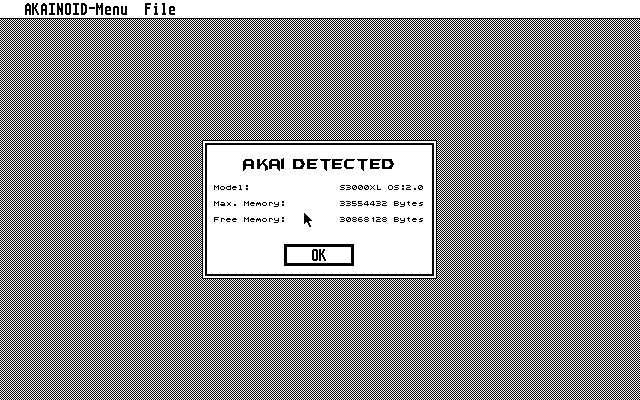
Restart or Re-Initialise ( [Ctrl] + [I] or item in the File menu ) SAMPLE Mode after saving Preferences. Once
you have actually wired up your Akai correctly, take notice of the detected Akai model
and its available RAM:
NOTE:
I only have an S3000XL, which confirms its presence with a number code "17.0", which
AKAINOID happily translates to "S3000XL OS:2.0". If you have a different Akai model or
operating system on your Akai, by now only its number code will be displayed.
Please send an email to me, if your code is different and let me know your code plus your sampler's
model name and its precise specification.
In case there are samples loaded to the memory
of your Akai, the application will now ask you if you want to delete or
plan to match those samples.
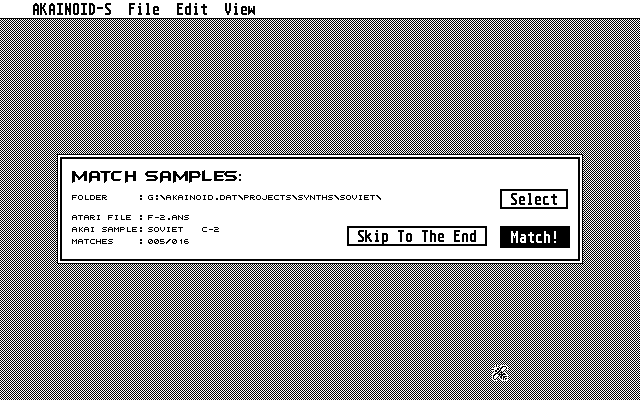
When matching a further alert box will pop up asking you if you
want to match the samples on the Akai with those actually saved in the
AKAINOID library folder on your Atari. This process may take some time
depending on the size of your AKAINOID library and may be skipped.
NEW:
You may know select a base folder different from the library folder for the matching process
limiting the time it takes to match the samples. You may skip the rest of
unmatched samples by clicking [ Skip To The End ] (Sorry for the reference to the telly series "Spaced").
You can go through these initial dialogues again later on
by choosing Re-Initialise from the pull-down menu or by pressing [Ctrl]+[I]
on the keyboard.
MATCHING:
You might have noticed: there's actually two levels of matching samples: The first level concerns the Sample List rather than the Sample itself.
In this case AKAINOID only knows about the existance of a sample on the Akai plus its name.
The second level or fully being matched means both AKAINOID and the sampler are familiar with all Sample data (The raw sample data as well as its properties).
|
|
|