Under Construction
 |
 |
 |
04.10 Open/Import (The AKAINOID File Selector)
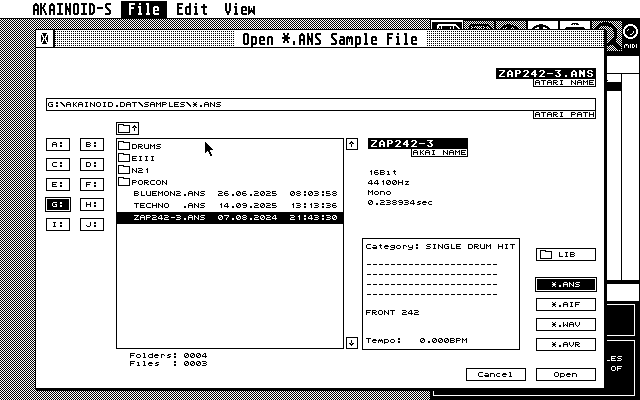
This will open the custimized file selector for opening *.ANS files or importing standard audio files. The basic functions should be obvious. You can step through sub directories of your library by double clicking on folder items in the list shown. Depending on the chosen file extension to filter your selected directory list, the button on the very bottom right should say "Open" (for *.ANS files) or "Import". In any case a folder selected it should say "Open" and clicking "Open" or hitting [RETURN] will open the folder. If an *.ANS file selected it should just start the loading process. For all other file types the importing process.
Depending on the file type more or less sample properties are shown in the middle of the window.
You can define two folders on your Atari disk as default folders.
The button labeled with "[Folder Symbol] LIB" (Akainoid Sample Library) or "[Folder Symbol] AUDIO" (audio pool/inbox) will open the corresponding folder stored in the Preferences ("AKAINOID.INF"). You can set both folders to the current directory path by holding [CTRL] when clicking this button.
Think of the Library folder as the root of your AKAINOID database and choose it and its folder structure underneath wisely. Avoid moving files or renaming files inside this folder or its subfolders or even opening and editing files inside of a text editor. Under no circumstances do stuff like this especially when you are drunk! A file selector asking for .ANS files will always open this folder initially.
Think of the Audio folder as the inbox or audio pool of AKAINOID. Copy audio files to be imported to this folder. Everytime you're about to import an audio file, the file selector will open this folder initially.
Both folder locations are stored in AKAINOID.INF when Saving Preferences.
More functions of the File Selector:
- Holding [SHIFT] while clicking one of the arrow buttons, will scroll down/up the list by a page.
- In order to browse through the file list you can also hit [CURSOR UP] or [CURSOR DOWN].
- In combination with [SHIFT] this will also scroll by a page.
- [CLR HOME] will scroll to the first index of the list.
- Holding [SHIFT] while pressing [CLR HOME] will scroll to the file list's end.
NEW
The file selector now shows date (DD.MM.YYYY) and time (24hrs) in addition to the the listed file names.
NOTE:
The Open/Import window unlike the Save window doesn't allow editing the Atari file name shown in the upper right.
The sample is loaded (or the audio file is imported) including its raw data in the corresponding .AIF file and is added to the Sample List at its end, where it awaits transmission to the sampler.
|
|
|