Under Construction
 |
 |
 |
04.09 Importing
In order to get a sample, which wasn't generated by AKAINOID, onto the sample list, you need to Import an audio file by choosing "Open / Import ..." from the File menu or by pressing [Ctrl] + [O].
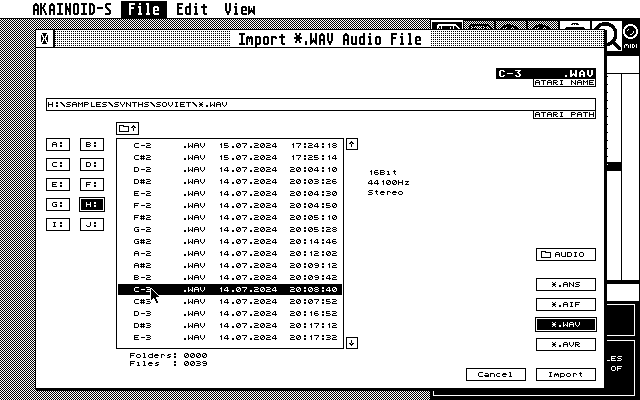
Now a customised file selector will pop up initially showing you a list of Akanoid *.ANS files. Select either *.AIF or *.WAV (.*.AVR files aren't supported yet). The button initially labeled with "Open" should show "Import" instead once you selected a file of these types.
Note that the bit depth of both file types must be 16Bit PCM and the sample rate must be either 44100Hz, 22050Hz or 11025Hz. Trying to load samples with different properties will now lead to an AKAINOID error message and the show will continue. Future releases will support *.AVR and maybe *.SMP files, too.
The imported file will be added to the Sample List at its end and can be saved to disk as a proper .ANS sample once it was transmitted to the Akai.
NOTE:
The bug of AKAINOID freezing when reading .AIF files containing extra information like tags for artists and the likes or markers should be history and fixed. AIFF chunks unknown or irrelevant to AKAINOID are simply skipped while loading.
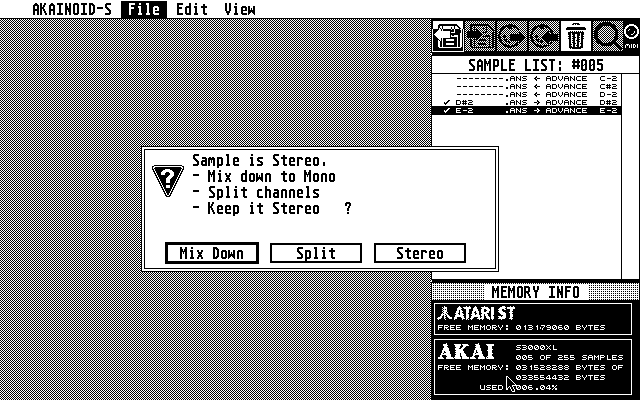
Furthermore you may now import stereo files considered you convert them to mono while loading. An alert box pops up asking you if you want to mix down to mono or rather split the stereo file into two seperate mono files (L/R). There's no sense in trying to load stereo not mixed down or split into mono files as AKAINOID by now can't process stereo data properly.
In the case of mixing down or splitting in mono AKAINOID will generate one or two .AIF files in your import directory:
- an .AIF file with a "|" as the last character of its filename for mix-downs.
- an .AIF file ending with "<" and one ending with ">" for the left and right stereo channels in case of splitting to mono.
you can keep or delete these files as you wish.
More on the new file selector windows later.
|
|
|