Under Construction
 |
 |
 |
04.08 Managing Files
As mentioned in the last chapter, the data on disk of an AKAINOID sample consists of three files carrying the same name but 3 different file extensions,
I thought, I'd make renaming and moving these 3 files a bit easier.
If you choose "Manage Files ..." from the File section of the pulldown menu or press [Ctrl] + [G], you can rename the sample's 3 Atari file names in a row and move them
to a different folder in one go.
Furthermore you will be able to delete AKAINOID samples from your Atari's hard disk.
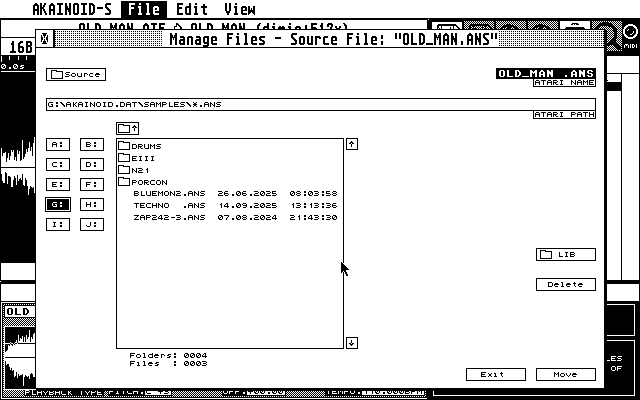
A customised File Selector will pop up at the folder location of the selected sample in the Sample List allowing you to choose a new location and Atari filename. You can enter a new Atari file name by clicking into the Atari Name field. A blinking cursor will show up accepting keyboard input. See chapter 04.06 for keyboard shortcuts while editing the file name. As long as you haven't navigated away from the original file location, the bottom right buttom will say "Rename". Once you are in a different folder, this button will say "Move". You can return to the source location by clicking the Button labeled with "[Folder symbol] Source". When you're done, just click the bottom right button or [Cancel] if you are unsure.
NOTE:
All 3 sample files will be deleted at the original location.
|
|
|