Under Construction
 |
 |
 |
05.05 The Filter Editor
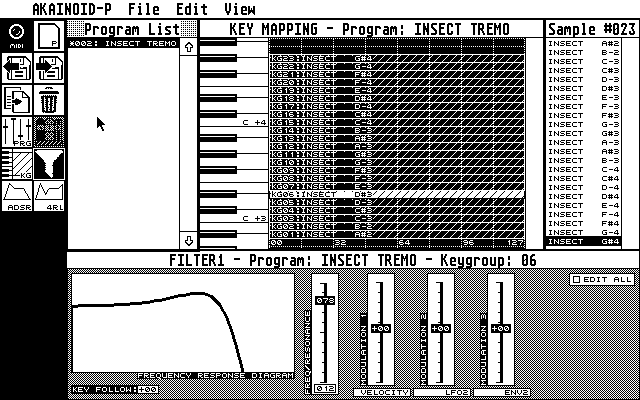
NEW: The Frequency Response Editor
v0.4.360 of AKAINOID introduces a real Frequency Response Editor rather than it just being a graph only.
Like in the Envelope Editors there's a single DMP (Data Manipulation Point) visualised as a small square in the area of the graph.
While hovering over the DMP, the mouse pointer changes to a cross-hair. Left-click the DMP now and keep the mouse button pressed:
As you move the mouse now, the two basic parameters (Cutoff Frequency and Resonance) of a resonant low-pass filter (like inside the S3000XL) will change and the graph is being redrawn immediately.
When you release the mouse button, these new values of Frequency and Resonance will be updated on the Akai via MIDI.
Alternatively you can enter the values for Frequency and Resonance to the left of the graph with the Atari keyboard.
[Ctrl]-click these values to do so. Just clicking the values will increment (left mouse button) or decrement (right button) them.
Holding [Shift] while clicking Frequency will increase or decrease its value by 10.
Holding [Shift] while clicking Resonance will increase or decrease its value by 5.
Below the graph you'll find the Key-Follow parameter (-24 to +24).
There's 3 faders for filter modulation. Step through the modulation sources below a fader by left-/right-clicking them and change the modulation depth (-50 to +50) dragging and dropping the fader itself.
|
|
|