Under Construction
 |
 |
 |
04.05 Receiving A Sample
If you choose "Receive Sample ..," from the File menu (alternatively press [R] or click the icon in the Tool Box above the sample list), a sample dump from the Akai is requested and the data of the selected sample is being received following the protocol of the Sample Dump Standard (SDS).
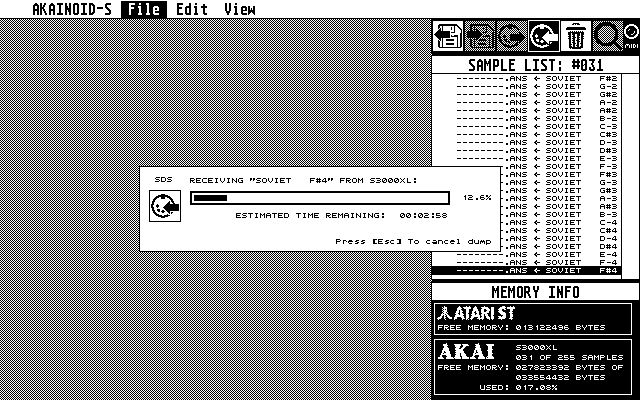
A dialog box will pop up displaying the progress of the dump and the Estimated Time Remaining. Note that depending on the length of the sample, this process takes quite some time. In my current set-up receiving the dump of a 44100Hz sample lasting precisely 4.0 seconds is taking about 3:55 minutes.
When the dump is complete a further dialog box will show statistics of the transfer. The information displayed might help you to improve your MIDI wiring for AKAINOID especially when many dump packets have to be requested again. You may bypass these stats in the Preferences.
When receiving the sample data has succeeded and you have inspected the statistics, two more windows will open, of which one shows the waveform of the sample and of which the other shows the sample properties as they are provided by the Akai sampler. Neither of these three windows now open can be moved or resized yet.
In the sample list you should now see a check mark in the second of the
columns mentioned in the last chapter, which indicates that the sample data is now
matched: Both Akai and Atari now hold the same information about the sample.
The third column between the check mark and the Atari file name should
display an asterix telling you the sample still needs to be saved to disk on
the Atari.
|
|
|