Under Construction
 |
 |
 |
05.03 The KEYGROUP/ZONES Editor
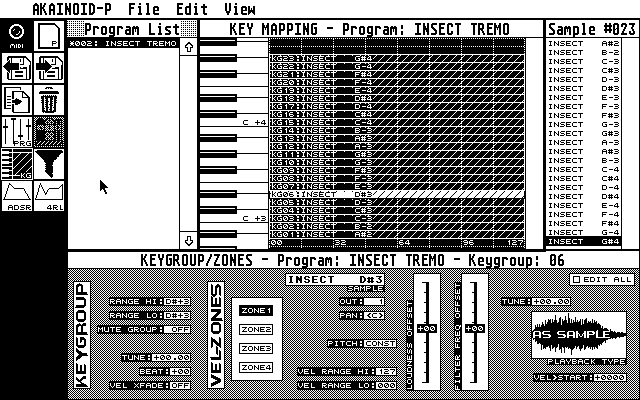
This window contains all the parameters related to an S3000XL keygroup apart from the Filter, Envelopes, LFOs and a few minor others, which have seperate windows. The Keygroup/Zones editor replaces the Program Properties window once a keygroup is selected in the Key Mapping editor above.
It also holds parameters related to the 4 velocity zones inside a keygroup. Click on one of the four Zone buttons to display the corresponding parameter set.
When you [Control]-click a Zone button, you "delete" its zone: Its sample is removed and the velocity range is set to 0.
In order to make use of an empty zone, drag & drop a sample from the sample list to the sample field of the Keygroup/Zones editor. You can also replace the sample of an active zone by dragging & dropping to this field.
There's a vertical lettering reading "Velocity Zones" to the left of the Zone buttons: Clicking it will replace the Key-Mapping editor by the Velocity Zones Editor (see below).
The same editing principles as in the Program Properties apply to this window, a few things should be pointed out though:
When [Ctrl]-clicking "Range Hi" of a keygroup, the cursor instantly jumps to the "Range Lo" field below. As soon you have entered the low range the cursor jumps back to "Range Hi" and is expecting input here. You can enter both of these MIDI notes with your master keyboard connected to AKAINOID as well.
Incrementing/decrementing the "Vel>Start"-field to the bottom right is digit-dependent like the "at:"-field in Sample Mode.
Edit All (Keygroups)
This checkbox is displayed in all windows containing parameters related to keygroups. If it is checked the same parameter change will be made for all keygroups of the same Program. Use this feature with care as
- updating the Akai might take a while especially when a Program holds many keygroups and
- you may not have really intended the results in their entirety.
I plan on adding a "Randomise"-checkbox to this feature, which will modify the entered value randomly within a certain range across the keygroups.
|
|
|